
您当前位置:首页 网卡/交换机驱动 ESXi 8.0集成驱动全版下载
类型:网卡/交换机驱动 版本:8.0U3g-24859861 版本
大小:633.9M 时间:2025-09-08


ESXi 8.0U3g版本是集成了众多的驱动版本,支持的nvme设备变多了,支持的网卡变多了,也就让更多的服务器能够兼容系统,在提高兼容性的情况下,让老服务器能够更好的发挥余热,我想很多朋友还在使用8.0版本也是想要中文web界面吧,毕竟新版居然没有了。
新增网卡兼容性
✅USB Network Native Driver: 该项目名为 USB 网络原生驱动,支持以下芯片和 ID 的网卡。
2022 年 11 月 23 日发布的 USB Network Native Driver 兼容 ESXi 8.0。
USB Network Native Driver for ESXi version 1.12 — April 26, 2023 (updated v1.15 - Jun 25, 2024)
Any adapters using the following chipsets and with the following VID/PID are supported.
| Vendor | Chipset | Speed | VendorID | DeviceID |
| AQUANTIA | AQC111U | 5G, 2.5G, 1G, 100M | 0xe05a | 0x20f4 |
| AQUANTIA | Aquantia Pacific | Unknown | 0x2eca | 0xc101 |
| ASIX | AX88179 | 10/100/1000M | 0x0b95 | 0x1790 |
| ASIX | AX88178a | 10/100/1000M | 0x0b95 | 0x178a |
| CISCO LINKSYS | RTL8153 | 10/100/1000M | 0x13b1 | 0x0041 |
| DLINK | RTL8156 | 2.5G, 1G, 100M, 10M | 0x2001 | 0xb301 |
| DLINK | AX88179 | 10/100/1000M | 0x2001 | 0x4a00 |
| INSYDE SOFTWARE CORP | Insyde Software Corp. | Unknown | 0x0b1f | 0x03ee |
| LENOVO | RTL8153 | 10/100/1000M | 0x17ef | 0x3062 |
| LENOVO | RTL8153 | 10/100/1000M | 0x17ef | 0x3069 |
| LENOVO | RTL8153 | 10/100/1000M | 0x17ef | 0x720a |
| LENOVO | AX88179 | 10/100/1000M | 0x17ef | 0x304b |
| LENOVO | RTL8153 | 10/100/1000M | 0x17ef | 0x7205 |
| NVIDIA | RTL8153 | 10/100/1000M | 0x0955 | 0x09ff |
| Qualcomm | NA | Unknown | 0x1A56 | 0x3100 |
| Qualcomm | NA | Unknown | 0x0b05 | 0x1976 |
| REALTEK | RTL8152 | 10/100M | 0x0bda | 0x8152 |
| REALTEK | RTL8156 | 2.5G, 1G, 100M, 10M | 0x0bda | 0x8156 |
| REALTEK | RTL8153 | 10/100/1000M | 0x045e | 0x07c6 |
| REALTEK | RTL8153 | 10/100/1000M | 0x0bda | 0x8153 |
| SITECOMEU | AX88179 | 10/100/1000M | 0x0df6 | 0x0072 |
| SUPERMICRO | Supermicro computer Inc | Unknown | 0x15d9 | 0x1b83 |
| TP-LINK | RTL8153 | 10/100/1000M | 0x2357 | 0x0601 |
| TRENDNET | AQC111U | 5G, 2.5G, 1G, 100M | 0xe05a | 0x20f4 |
| Broadcom | BCM5719 Gigabit Ethernet Controller | 10/100/1000M | 0x14e4 | 0x1657 |
| Intel | I350 Gigabit Network Connection | 10/100/1000M | 0x8086 | 0x1521 |
| Mellanox | ConnectX-3 Pro EN 10GbE Adapter | 10G, 1G, 100M | 0x15b3 | 0x1003 |
| Marvell | 88E8057 Gigabit Ethernet Controller | 10/100/1000M | 0x11ab | 0x4380 |
| QLogic | QLE3242 10GbE SFP+ Adapter | 10G, 1G | 0x1077 | 0x2522 |
Community Networking Driver 项目中的驱动已经获得 ESXi 8.0 的官方支持。
icg: Any PCIe network adapters with VID/PID listed below are supported in ESXi 8.0 and newer
| Vendor | Chipset | VendorID | DeviceID |
| Intel | Ethernet Controller I225-LM | 0x8086 | 0x15f2 |
| Intel | Ethernet Controller I225-V | 0x8086 | 0x15f3 |
| Intel | Ethernet Controller I225(blankNVM) | 0x8086 | 0x15fd |
| Intel | Ethernet Controller I225-IT(2) | 0x8086 | 0x0d9f |
| Intel | Ethernet Controller I225-I | 0x8086 | 0x15f8 |
| Intel | Ethernet Controller I225-K | 0x8086 | 0x3100 |
| Intel | Ethernet Controller I225-K(2) | 0x8086 | 0x3101 |
| Intel | Ethernet Controller I225-LMvP(2) | 0x8086 | 0x5502 |
| Intel | Ethernet Controller I226-LMvP(2) | 0x8086 | 0x5503 |
| Intel | Ethernet Controller I226-K | 0x8086 | 0x5504 |
| Intel | Ethernet Controller I226-LM | 0x8086 | 0x125b |
| Intel | Ethernet Controller I226-V | 0x8086 | 0x125c |
| Intel | Ethernet Controller I226-IT | 0x8086 | 0x125d |
| Intel | Ethernet Controller I226(blankNVM) | 0x8086 | 0x125f |
| Intel | Ethernet Controller I220-V | 0x8086 | 0x15f7 |
| Intel | Ethernet Controller I221-V | 0x8086 | 0x125e |
| Intel | Ethernet Controller I222-LM | 0x8086 | 0x15f1 |
| Intel | Ethernet Controller I222-V | 0x8086 | 0x15f0 |
| Intel | Ethernet Controller I225-M | 0x8086 | 0x15fa |
| Intel | Ethernet Controller I225-BT | 0x8086 | 0x15f9 |
| Intel | Ethernet Controller I226-M | 0x8086 | 0x1260 |
| Intel | Ethernet Controller I226-BT | 0x8086 | 0x1261 |
e1000: 8.0 U3 更新又带来了多款新的型号支持。
| Vendor | Chipset | VendorID | DeviceID | Note |
| Intel | Ethernet Connection (8) I219-LM | 0x8086 | 0x15df | |
| Intel | Ethernet Connection (8) I219-V | 0x8086 | 0x15e0 | |
| Intel | Ethernet Connection (9) I219-LM | 0x8086 | 0x15e1 | |
| Intel | Ethernet Connection (9) I219-V | 0x8086 | 0x15e2 | |
| Intel | Ethernet Connection (10) I219-LM | 0x8086 | 0x0d4e | |
| Intel | Ethernet Connection (10) I219-V | 0x8086 | 0x0d4f | |
| Intel | Ethernet Connection (11) I219-LM | 0x8086 | 0x0d4c | |
| Intel | Ethernet Connection (11) I219-V | 0x8086 | 0x0d4d | |
| Intel | Ethernet Connection (12) I219-LM | 0x8086 | 0x0d53 | |
| Intel | Ethernet Connection (12) I219-V | 0x8086 | 0x0d55 | |
| Intel | Ethernet Connection (13) I219-LM | 0x8086 | 0x155b | |
| Intel | Ethernet Connection (13) I219-V | 0x8086 | 0x155c | |
| Intel | Ethernet Connection (14) I219-LM | 0x8086 | 0x15f9 | |
| Intel | Ethernet Connection (14) I219-V | 0x8086 | 0x15fa | |
| Intel | Ethernet Connection (15) I219-LM | 0x8086 | 0x15f4 | |
| Intel | Ethernet Connection (15) I219-V | 0x8086 | 0x15f5 | |
| Intel | Ethernet Connection (16) I219-LM | 0x8086 | 0x1a1e | |
| Intel | Ethernet Connection (17) I219-V | 0x8086 | 0x1a1f | |
| Intel | Ethernet Connection (17) I219-LM | 0x8086 | 0x1a1c | |
| Intel | Ethernet Connection (17) I219-V | 0x8086 | 0x1a1d | |
| Intel | Ethernet Connection (18) I219-LM | 0x8086 | 0x550a | New in U3 |
| Intel | Ethernet Connection (18) I219-V | 0x8086 | 0x550b | New in U3 |
| Intel | Ethernet Connection (19) I219-LM | 0x8086 | 0x550c | New in U3 |
| Intel | Ethernet Connection (19) I219-V | 0x8086 | 0x550d | New in U3 |
| Intel | Ethernet Connection (20) I219-LM | 0x8086 | 0x550e | New in U3 |
| Intel | Ethernet Connection (20) I219-V | 0x8086 | 0x550f | New in U3 |
| Intel | Ethernet Connection (21) I219-LM | 0x8086 | 0x5510 | New in U3 |
| Intel | Ethernet Connection (21) I219-V | 0x8086 | 0x5511 | New in U3 |
| Intel | Ethernet Connection (22) I219-LM | 0x8086 | 0x0dc7 | New in U3 |
| Intel | Ethernet Connection (22) I219-V | 0x8086 | 0x0dc8 | New in U3 |
| Intel | Ethernet Connection (23) I219-LM | 0x8086 | 0x0dc5 | New in U3 |
| Intel | Ethernet Connection (23) I219-V | 0x8086 | 0x0dc6 | New in U3 |
| Intel | Ethernet Connection (24) I219-LM | 0x8086 | 0x0dc9 | New in U3 |
| Intel | Ethernet Connection (24) I219-V | 0x8086 | 0x0dca | New in U3 |
| Intel | Ethernet Connection (25) I219-LM | 0x8086 | 0x0dcb | New in U3 |
| Intel | Ethernet Connection (25) I219-V | 0x8086 | 0x0dcc | New in U3 |
| Intel | Ethernet Connection (26) I219-LM | 0x8086 | 0x0dcd | New in U3 |
| Intel | Ethernet Connection (26) I219-V | 0x8086 | 0x0dce | New in U3 |
另有约 14 款新增的网卡获得支持,多为较高端的型号,这里就不一一列出了。
2021 年 11 月 10 日发布的 Community NVMe Driver for ESXi 更新,支持 ESXi 7.0 及更新版本,同样可用于 ESXi 8,支持以下存储设备:
Community NVMe Driver for ESXi version 1.2 — November 10, 2021
Non-Apple NVMe:
VMware ESXi 7.0 (x86) or newer is required
Any NVMe storage devices with VID/PID listed below are supported
| Vendor | VendorID | DeviceID |
| ADATA | 0x1cc1 | 0x8201 |
| Micro/Crucial | 0xc0a9 | 0x2263 |
| Silicon Motion | 0x126f | 0x2262 |
| Kingston | 0x0951 | 0x1666 |
| Samsung | 0x04e8 | 0x61f5 |
| Western Digital | 0x1058 | 0x25a3 |
| Kioxia | 0x1179 | 0x0116 |
| Plextor | 0x1987 | 0x5012 |
该项目虽已被弃用,但仍可在特定场景下发挥作用,故保留。
1、我们将文件放入u盘启动盘中,建议用Ventoy去制作启动盘,将启动盘插入到服务器上,开始安装;
2、开始初始化然后开始部署系统;
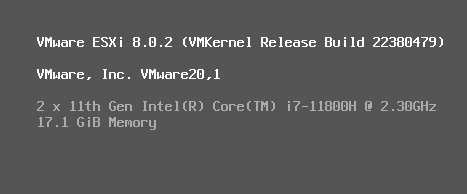
3、开始进行初始化,稍作等待;
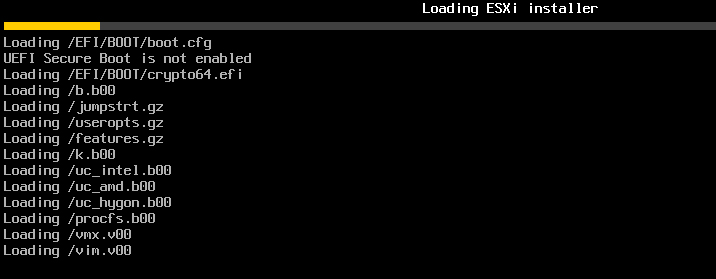
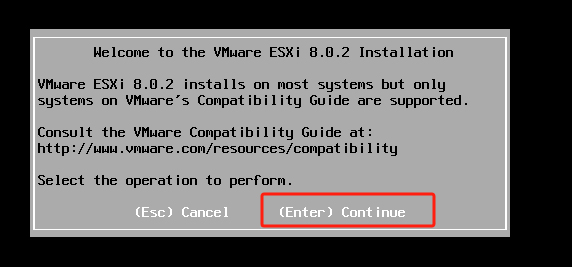
4、出现以下界面,按Enter开始进行系统部署的设置;
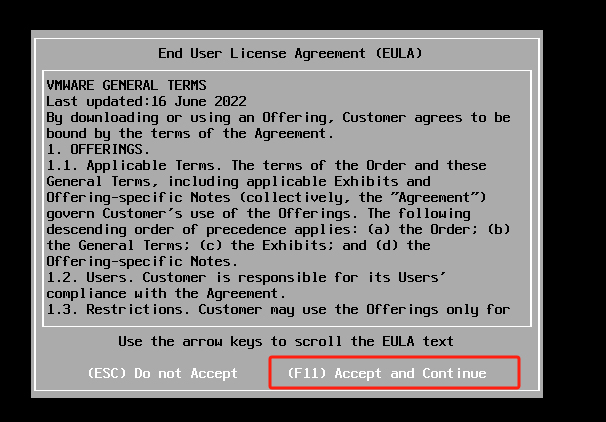
5、按F11,接受许可协议,并继续;
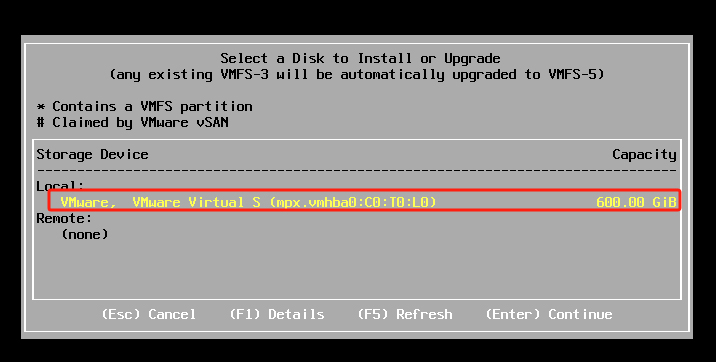
6、选择安装的磁盘,然后按Enter继续;
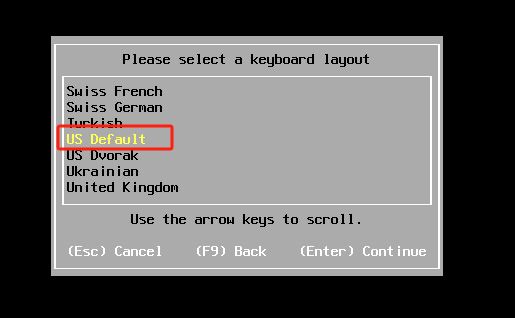
7、选择键盘类型,直接保持默认即可;
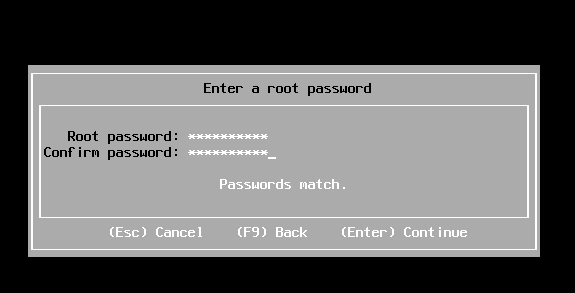
8、设置系统的root密码(要满足密码强度:8位以上含数字和特殊符号)
9、按F11 开始安装系统
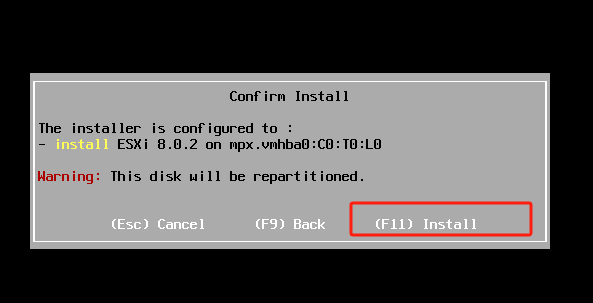
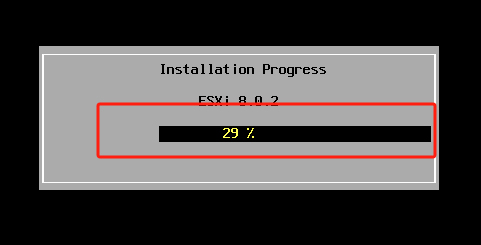
10、等待安装进程完成
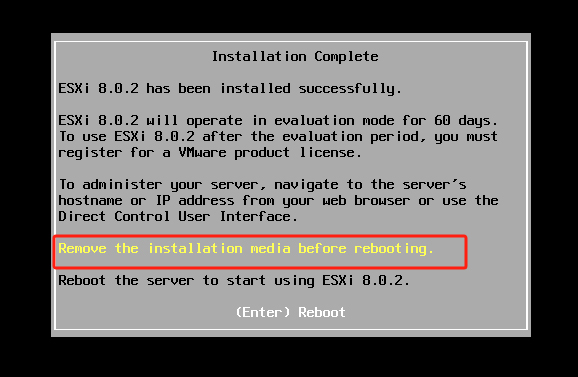
11、然后按Enter重启服务器
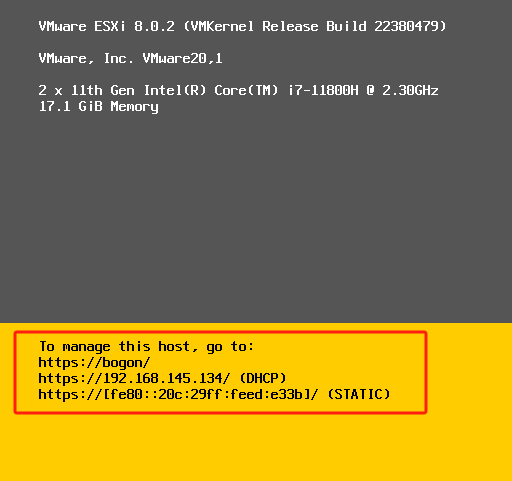
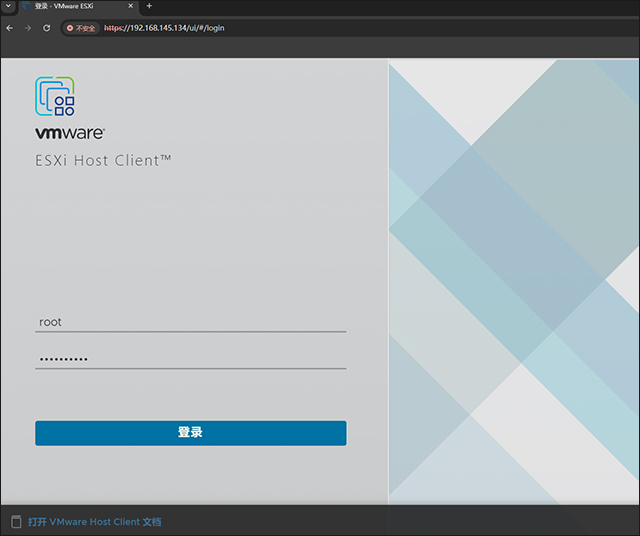
12、重启后等待获取地址,如图显示,然后通过浏览器访问https://192.168.145.134
13、输入用户名密码,进行登录;
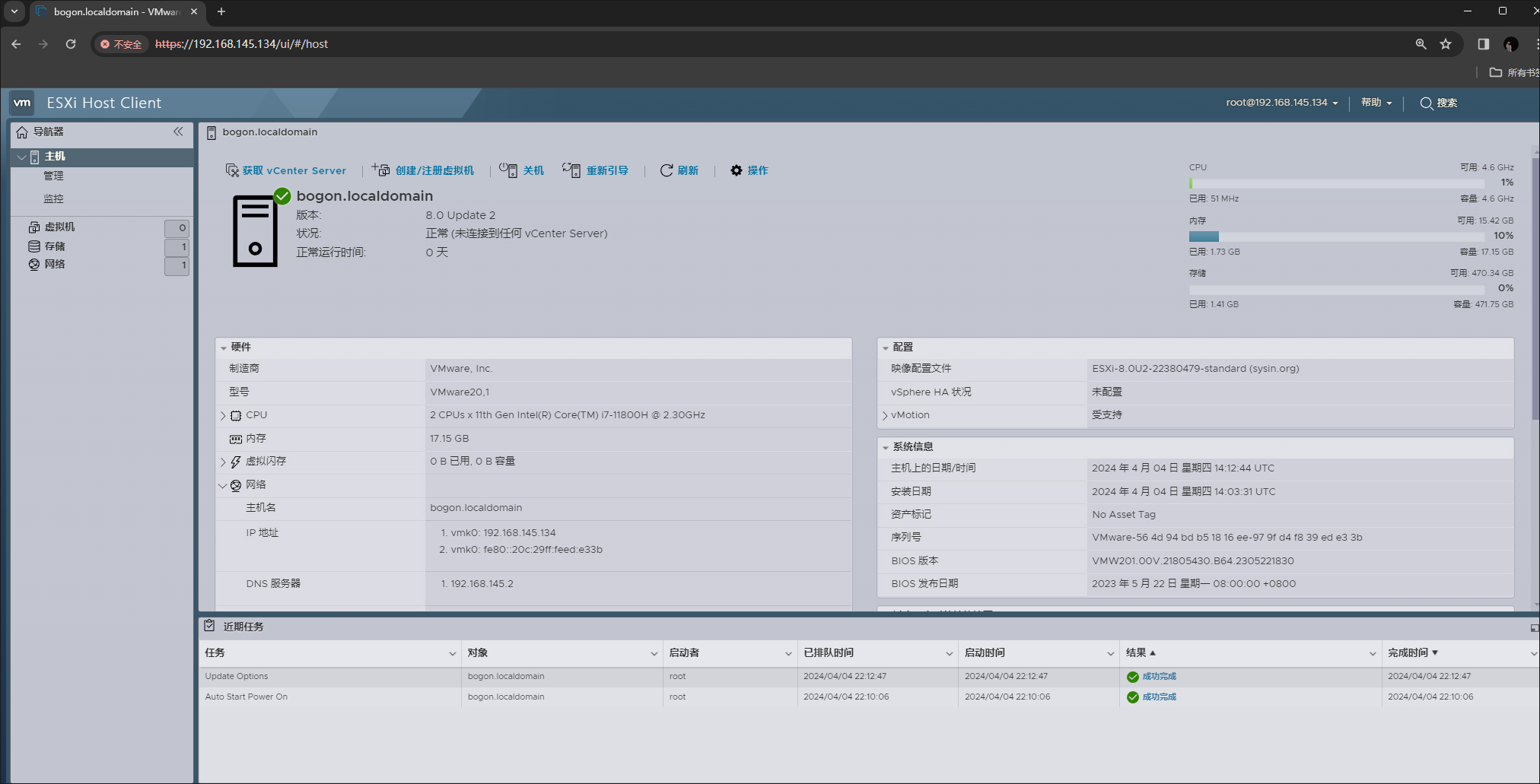
14、进入ESXi 8.0主机操作界面,如图所示,可以进行基本的配置和操作,更多的功能实现需要依靠vCenter Server实现。









支持( 0 ) 盖楼(回复)
支持( 0 ) 盖楼(回复)
支持( 0 ) 盖楼(回复)
支持( 0 ) 盖楼(回复)
支持( 0 ) 盖楼(回复)